
Rename Files
Generate clean, consistent file names and folder structures from your audio metadata.
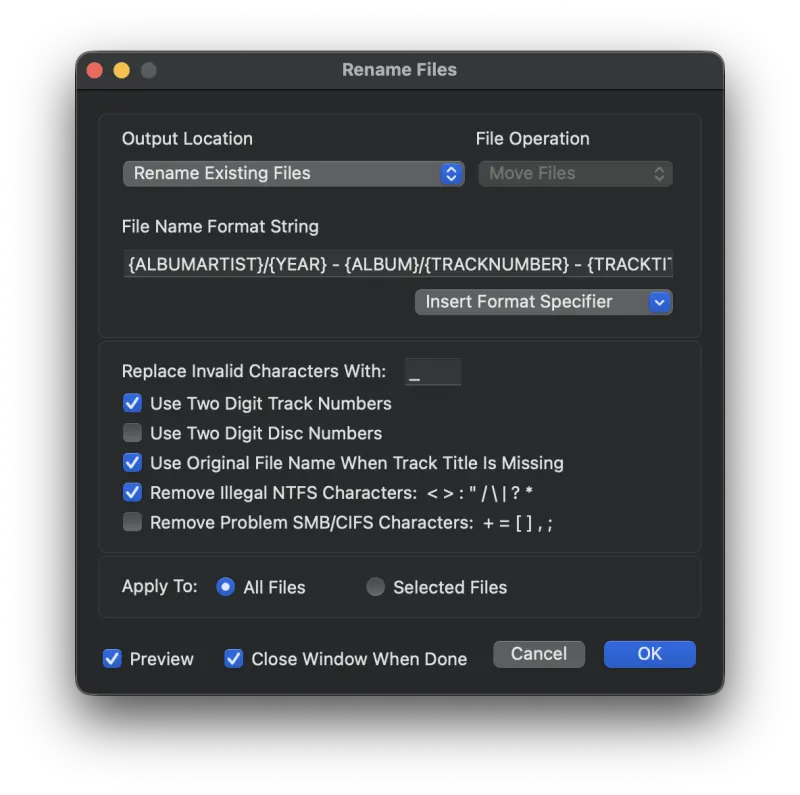
The Rename Files function lets you rename audio files using their metadata. You can rename files in place or copy them to a new location, building a directory structure along the way (for example, Album Artist / Album / Track # - Track Title).
Note: Due to Apple's sandboxing requirements, you may be prompted for permission to rename the files. When prompted, choose Allow Rename and the operation will proceed. Metadatics remembers the folders you allow, so you won’t be asked again for them. To avoid being asked for each album, choose a parent folder such as your music library instead — that grants access to everything inside it.
Options Explained
- Output Location
- Choose whether to rename the existing files in place, or copy them to another location.
- File Operation
- If you are not renaming files in place, choose whether to copy or move them to the new location.
- File Name Format String
- The format string defines what the output file name will look like. Enclose tag names in brackets and Metadatics will replace them with the actual tag value. You can include any literal text outside the brackets. Use a forward slash to separate directories.
In the screenshot above, a folder is created named after the Album Artist. Inside that, another folder is created named after the Album. Inside that, the files are named Track Number - Track Title. - Replace Invalid Characters With
- Some characters are invalid in file names. This field specifies a replacement character. Leave it blank to simply remove invalid characters.
- Use Two Digit Track and Disc Numbers
- Enabling this option pads Track and Disc numbers to two digits, so 1 becomes 01.
- Use Original File Name When Track Title Is Missing
- If your format string uses
TRACKTITLEbut a given track has no Track Title, enabling this option falls back to the original file name. - Remove Illegal NTFS Characters
- Removes characters invalid on NTFS file systems and replaces them with the character from the Replace Invalid Characters With field.
- Remove Problem SMB/CIFS Characters
- Removes characters that frequently cause problems when copying over SMB or CIFS network shares.
- Apply To
- Apply the rename to all files, or only to the selected files.
- Preview
- Turn on Preview Mode to see the proposed file names before committing the rename. Results are shown in red text in the File Name and Full Path columns of the file list.
Still need help? Email [email protected] or send a message.