
File Name To Tags
Pull metadata out of file and folder names using a format string.
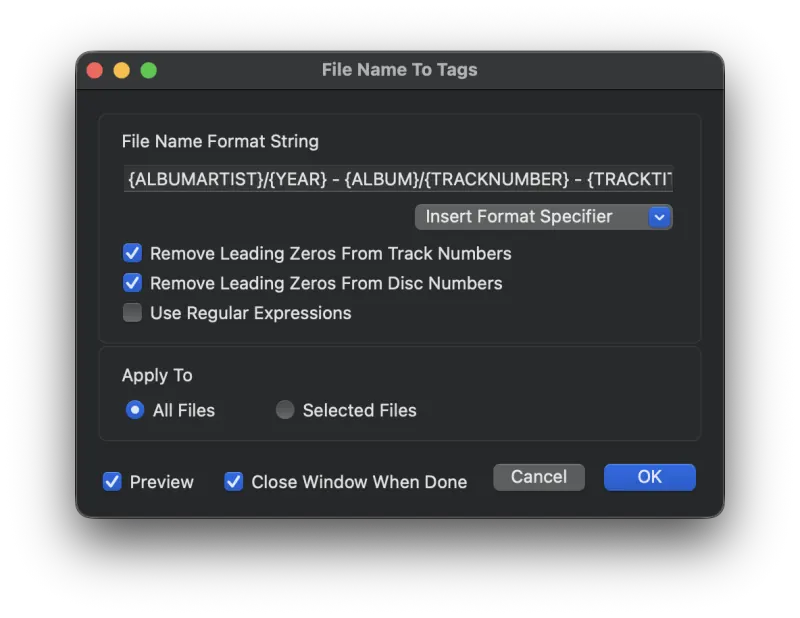
This function extracts tags from a file's name. If your file names follow a consistent pattern, enter that pattern into this function and Metadatics will populate the matching tags. In the example below, the file names all follow the pattern Track Number, period, space, Track Title, which is entered into the File Name Format String field.
Options Explained
- File Name Format String
- The pattern that the file names use. You can also separate folders with a forward slash. For example, if every file lives in a folder named after the album artist, use
{ALBUMARTIST}/{TRACKNUMBER}. {TRACKTITLE}. - Remove Leading Zeros From Disc & Track Numbers
- When enabled, leading zeros are stripped from Disc Number, Disc Total, Track Number, and Track Total tags (e.g. 01 becomes 1).
- Use Regular Expressions
- Allows regular expressions in your format string. See regular-expressions.info for more on regex syntax.
- Apply To
- Apply this function to all files, or only to the selected files.
- Preview
- Turn on Preview Mode to see what the results are going to be before committing. Results are shown in red text.
Tip: Use the Insert Format Specifier pull-down to insert common tags. You can also enclose any tag name in brackets by typing it yourself.
Still need help? Email [email protected] or send a message.