
Number Sequence
Generate a sequence of numbers and apply it to a tag. Perfect for filling out Track Number.
The Number Sequence function sets tag values to a generated sequence of numbers. You can also add the sequence to an existing tag at any position. The sequence increments once per selected file, so if you have 14 files selected, the sequence increments 14 times. This function is especially useful for quickly filling out the Track Number tag.
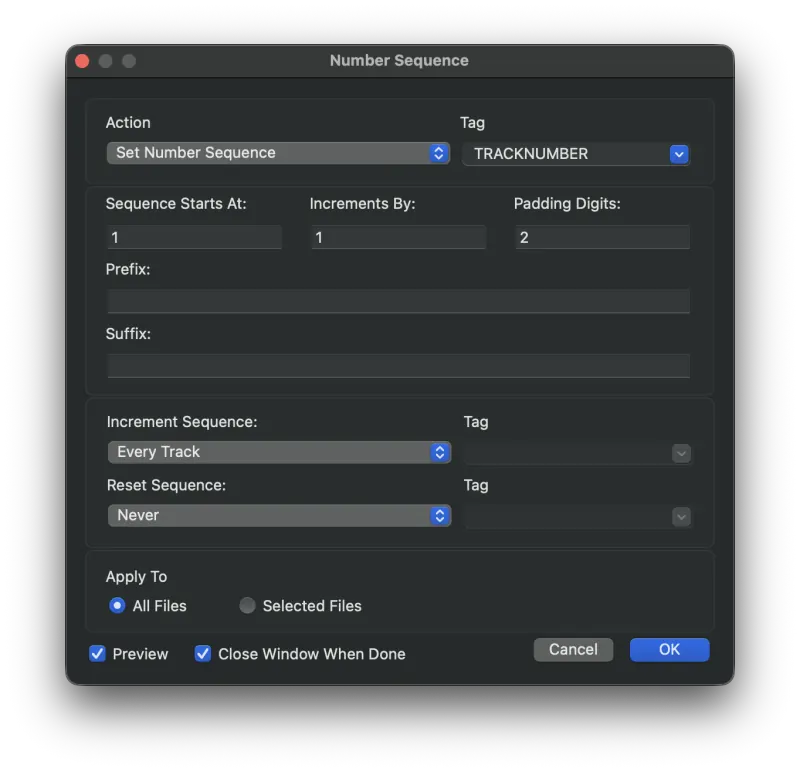
Actions
- Set Number Sequence
- Set the value of the given tag to the number sequence, replacing any existing values.
- Insert Number Sequence At Beginning
- Insert the number sequence at the beginning of the given tag's value, before any existing value.
- Insert Number Sequence At End
- Insert the number sequence at the end of the given tag's value, after any existing value.
- Insert Number Sequence At Position
- Insert the number sequence anywhere within the tag's value, at the given position.
Options Explained
- Tag
- Which tag to apply the number sequence to. Any tag is supported.
- Position
- Appears when Insert Number Sequence At Position is selected. Specifies the character position in the tag's existing value where the sequence should be inserted. For example, to insert a sequence of numbers five characters into the Track Title, enter 5.
- Sequence Starts At
- The number that the sequence begins at.
- Increments By
- The number that the sequence increments by.
- Padding Digits
- The minimum number of digits that the number sequence should always be. Zeros are prepended up to the specified number of digits. With padding 3, a value of 1 becomes 001, 12 becomes 012, and 999 stays 999.
- Prefix
- A prefix string placed before the number sequence.
- Suffix
- A suffix string placed after the number sequence.
- Increment Sequence
- When the sequence should increment.
- Every Track - The sequence increments once for every track.
- When Tag Changes - The sequence increments whenever the given tag changes.
- When Folder Changes - The sequence increments whenever a new folder is encountered.
- Reset Sequence
- When the sequence should reset.
- Never - Never reset the sequence.
- When Tag Changes - Reset whenever the given tag changes.
- When Folder Changes - Reset whenever a new folder is encountered.
- Apply To
- Apply this function to all files, or only to the selected files.
- Preview
- Turn on Preview Mode to see what the results are going to be before committing. Results are shown in red text.
Still need help? Email [email protected] or send a message.